
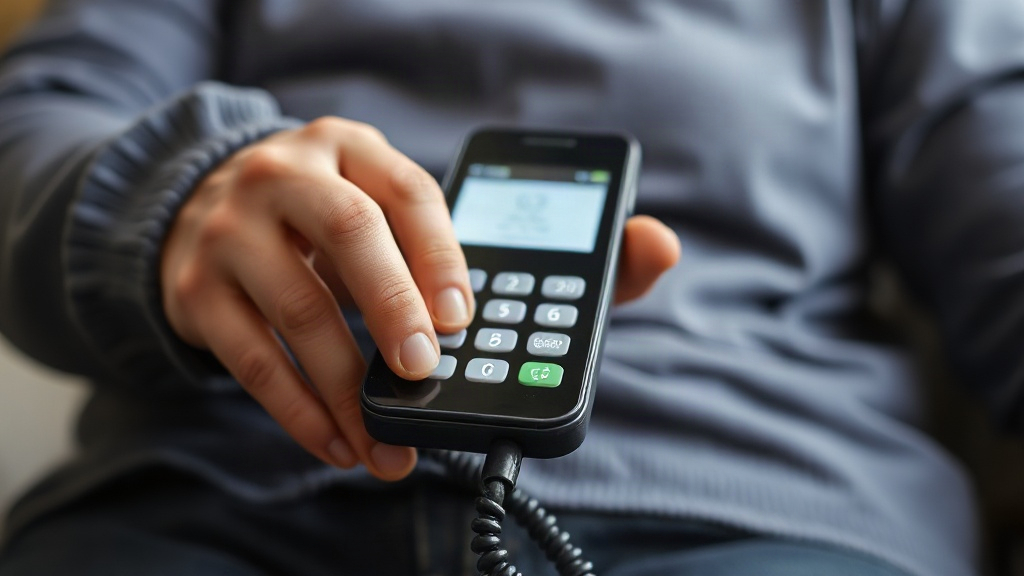
A parent with dementia forgets which phone number to call, then forgets how to dial at all. You want a device that makes calling family safe and simple, and raz memory phone for dementia patients is one of the names you keep hearing. Does it actually work, and who handles the setup?
Quick answer: A raz memory phone for dementia patients is a simplified calling device paired with a company-run support service that preloads your family’s numbers and offers the user a one-touch or voice-based way to place a call. It matters most when a person can still dial a familiar number but struggles with menus, contacts and tiny buttons. Expect the caregiver to configure the device, not the user.
This article explains what the setup actually involves, why it helps in some situations but not others, and how to avoid mistakes that cause confusion or waste money. You will finish with a clear checklist for deciding whether it fits your household.
What is raz memory phone for dementia patients?
A raz memory phone for dementia patients is best understood as a service, not just a handset. The user gets a simplified calling experience, and a caregiver or the company’s support team handles the numbers, labels and ease of access. That split of labor is the core idea behind the device.
The product typically appears in configurations like these:
- A simplified home phone with large keys or a photo-based keypad, where each key is mapped to one person.
- A voice assistant link, so the user can say "call my daughter" instead of dialing.
- Preloaded contacts, so family numbers are already programmed before the phone reaches your parent’s home.
Who is it designed for?
The intended user is someone in the mild-to-moderate stages of dementia who can still hold a short conversation by phone. They may misplace papers, forget area codes, or get lost in a contacts list. They still know who they want to talk to — they just cannot manage the steps quickly.
The person the device is not built for is someone with advanced dementia who cannot recognize a ringing phone or operate any button. For that stage, spending on a memory phone rarely pays off.
Feature sets, package names and pricing on memory phone services change often. Confirm current details on the manufacturer’s own site before you order.
What the setup looks like in practice
A typical setup runs through a few predictable steps:
- You or a family member call or go online to arrange the service.
- You supply the names and numbers that should appear on the device.
- The phone arrives with those contacts already programmed.
- The user presses a labeled key or speaks a name to connect.
The caregiver’s job never really ends after setup. When numbers change, someone has to update the device, or the user calls a disconnected line and loses confidence in the phone.
The strongest memory phones remove decisions, not just buttons. A phone with one clearly labeled key per person beats a phone with fifty stored contacts.
Why raz memory phone for dementia patients matters

Losing the ability to call someone is a quiet loss of independence. People with dementia often stop initiating calls long before they stop wanting company. They fear dialing wrong, embarrassing themselves or being a bother. A device that removes that friction can keep a social link alive.
Here are the reasons to consider one:
- Fewer failed calls. Unrecognized numbers and wrong prefixes cause confusion. Preloaded, labeled contacts cut those failures sharply.
- Reduced caregiver load. You do not have to call at exactly the same time each day just to confirm your parent is fine.
- A safety channel. In a fall, a bad night or a moment of fear, one press on a familiar name may reach help faster than a search through a phone book.
- Preserved dignity. The device looks like a phone, not a medical alarm, which many people with dementia resist wearing.
The emotional argument often outweighs the technical one. A woman who will not wear a pendant alarm may well press a large photo button to call her son.
Where the approach falls short
A memory phone is not a monitoring system. It will not detect wandering, missed medication or a fall in another room. It also cannot protect a user who forgets the phone exists, or who presses the wrong labeled key in confusion.
The phone also depends on a working home line or internet connection. If that fails, so does the call. Keep a plain backup phone in the home and make sure the user knows the main number of a trusted neighbor.
Do not rely on a memory phone as the only safety measure for anyone living alone with dementia. Pair it with in-person checks or a monitored alarm system.
Best practices
Small details decide whether a memory phone gets used daily or sits ignored in a drawer. These practices come from the way caregivers and families actually deploy simplified phones.
Set it up around real calling habits
Ask who your parent actually calls, not who you think they should call. If the answer is one sister and a neighbor, then three labeled keys are enough. A long list of relatives your parent rarely speaks to adds noise.
Order the keys by importance. Put the most trusted person in the most obvious spot. Label keys with both a name and a photo, since recognizing faces is often easier than reading small print.
Match the phone to the stage, not the diagnosis
A diagnosis label tells you little. What matters is what the person can still do today. Test the phone together before you commit to a service and watch what happens.
- Can they find the phone when it rings?
- Do they press the right key without prompting?
- Do they understand a spoken command?
- Do they remember the phone exists a week later?
If two or three answers are no, a different solution may suit your parent better.
Involve the user in the decision
Adults with early dementia notice when a device is chosen for them like a child’s toy. Explain the phone as a convenience, not a safety net. Let them choose the ringtone or the color where possible. Ownership raises the odds they keep using it.
Run a two-week trial with a small set of contacts before expanding. Habits form faster when the first version is simple.
Keep the caregiver side organized
Write down the contact list and the account details. Store them where another family member can find them. If the primary caregiver is ill or away, the phone must not depend on one person’s memory.
Review the numbers every three months. Update any line that changes. Confirm the user still knows the key for their most-called person.
Common mistakes to avoid
Most failures with memory phones trace back to the purchase decision, not the device. Families buy too much, too late, or without testing in the real home.
Buying at the wrong stage
The most expensive mistake is timing. A family buys a memory phone when the person can no longer use any phone, or waits until a crisis forces a hurried purchase. Both outcomes waste money and create stress.
Watch for the middle window: the person still converses by phone but starts fumbling the mechanics. That is when a simplified device delivers the most benefit.
Confusing it with a full care system
A memory phone calls people. It does not watch, track or alert. Some families assume a simplified phone covers safety, then skip other measures. That leaves a gap in exactly the moments when help is needed most.
Overloading the contact list
Give the user a small, stable set of numbers. Ten keys confuse; three keys work. When a new contact matters more than an old one, replace rather than add.
Skipping the test call routine
Practicing once is not enough. Ask a family member to call the phone and let the user answer it a few times in the first week. Repeat the practice monthly. Familiarity fades, and a forgotten answer routine ruins confidence.
A memory phone earns its keep when it is simple, tested in the home and supported by a caregiver who reviews it regularly. Skip any of those three and the money is wasted.
FAQ
Is a memory phone suitable for someone with advanced dementia?
Usually not. A person who cannot recognize a ringing phone or follow a one-step instruction gains little from the device. Focus instead on supervised care and monitored safety devices. A memory phone fits the mild-to-moderate stage best.
How much does it cost, and is it worth the price?
Prices vary by package and change with promotions, so check the manufacturer’s current offer. Judge the value against failed calls and caregiver hours, not just the sticker price. If the phone keeps one social link active for a year, most families find that worth it.
Who sets up and programs the phone?
The caregiver or the company’s support service handles setup. Your relative should not need to program contacts or change settings. Ask before buying whether the company will add or change numbers for you after purchase, and confirm whether that support carries a fee.
Can a memory phone replace a medical alert system?
No. A memory phone only places calls to people you list. It does not detect falls, summon emergency services on its own, or monitor the home. Many families use both a simplified phone and a separate alarm. Treat them as complements, not substitutes.
What if my parent refuses to use it?
Try naming it as a convenience for keeping in touch rather than a safety device. Let your relative help choose contacts and the ringtone. If refusal continues for two weeks, the phone is probably a poor fit for now. Revisit the decision later.
Conclusion
The raz memory phone for dementia patients works when it matches the user’s stage, stays simple and gets tested in the real home. Preloaded contacts, photo-labeled keys and a caregiver who reviews the setup regularly do more good than extra features. The common traps are buying too late, expecting the phone to supervise and cramming in too many numbers.
Start with one practical step: write down the three people your relative calls most. Then contact the provider and ask how those numbers get programmed and updated. Test the phone for two weeks before you decide whether to keep it, and keep a backup plan for safety in place regardless. Careful setup now keeps a familiar voice within reach far longer.